Brochure Sizes Guide: Standard Dimensions for Print and Design
Brochure Sizes Guide: Standard Dimensions for Print and Design You have spent hours perfecting the content for your brochure. The
You have spent hours perfecting the content for your brochure. The design looks great, the message is clear, and the images are sharp. But if the size is wrong, none of that matters. A brochure that is too large gets ignored. One that is too small cannot carry enough information. And one that does not fold correctly looks unprofessional the moment someone picks it up. Choosing the right brochure sizes is one of the most important decisions in print marketing — and most people overlook it completely.
This complete guide covers every standard brochure size, fold type, paper dimension, and use case so you can make the right choice for your brand. Whether you are printing a product catalogue, event handout, restaurant menu, or corporate profile, you will find the exact size and format you need right here.
What Is a Brochure Size?
A brochure size refers to the physical dimensions of the printed and folded piece of paper. It is usually measured in:
- Millimetres (mm) — most common in India, UK, and Europe
- Inches — common in the US
- Centimetres (cm) — sometimes used for quick reference
Brochure size is defined in two ways:
Open size — the full flat sheet before folding. This is the size your designer works with.
Finished size — the size after folding. This is what the customer holds in their hand.
Getting both measurements right is essential for a clean, professional result. A mismatch between design size and print size leads to content being cut off, misaligned folds, or uneven panels.
Why Brochure Size Matters?
Brochure size affects more than just how it looks. It directly impacts:
1. How much content fits: Larger brochures allow for more text, images, and detail. Smaller formats force you to prioritise and keep things concise.
2. Printing cost: Standard sizes like A4 and A5 are the most affordable to print because they fit neatly onto standard press sheets with minimal waste.
3. Distribution method: A DL brochure fits inside a standard envelope and is perfect for direct mail. A larger A3 brochure works better as a display piece or counter handout.
4. Reader experience: The size should match how people will use it — carrying it in a pocket, filing it in a folder, or displaying it on a rack.
5. Brand impression: An oversized, luxury gate-fold brochure feels premium and exclusive. A compact DL brochure feels practical and accessible. Size communicates brand personality before a single word is read.
Standard Brochure Sizes in India and Worldwide
A4 Brochure Size
Dimensions: 210 x 297 mm (8.27 x 11.69 inches)
The A4 size is the most widely used paper size in India, the UK, Europe, and most of Asia. It is the default choice for most brochures and the base sheet for bi-fold and tri-fold formats.
Best for:
- Product catalogues
- Company profiles
- Service brochures
- Annual reports
A4 brochures are easy to file, widely recognised, and work with most display stands and holders. They are the safest and most versatile choice for general business use.
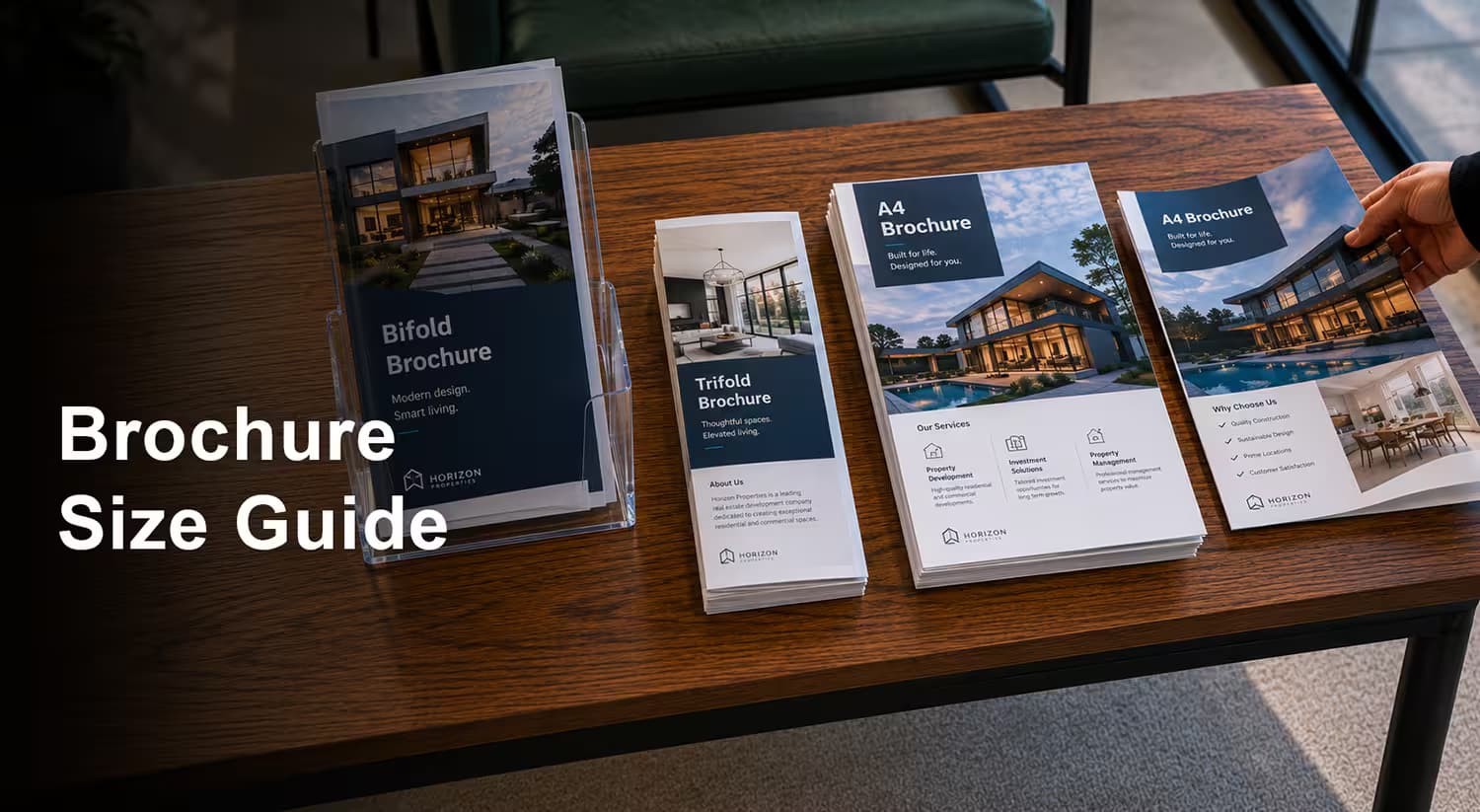
A4 Brochure Size
Dimensions: 210 x 297 mm (8.27 x 11.69 inches)
The A4 size is the most widely used paper size in India, the UK, Europe, and most of Asia. It is the default choice for most brochures and the base sheet for bi-fold and tri-fold formats.
Best for:
- Product catalogues
- Company profiles
- Service brochures
- Annual reports
A4 brochures are easy to file, widely recognised, and work with most display stands and holders. They are the safest and most versatile choice for general business use.
A5 Brochure Size
Dimensions: 148 x 210 mm (5.83 x 8.27 inches)
A5 is exactly half of A4. It is compact, easy to carry, and cost-effective to print. This size is extremely popular for small businesses, events, and retail promotions.
Best for:
- Event handouts
- Restaurant menus
- Retail promotions
- Healthcare information leaflets
- Real estate flyers
A5 brochures are lightweight and easy to distribute in bulk. They fit comfortably in a hand or handbag without feeling bulky.
A3 Brochure Size
Dimensions: 297 x 420 mm (11.69 x 16.54 inches)
A3 is twice the size of A4. It is used when you need maximum visual impact — large images, detailed maps, or complex layouts that need space to breathe.
Best for:
- Posters and large display brochures
- Maps and location guides
- Architecture and interior design portfolios
- Luxury product launches
A3 brochures are not designed for hand distribution. They work best as display pieces, wall posters, or folded into A4 for file-friendly presentation.
DL Brochure Size
Dimensions: 99 x 210 mm (3.9 x 8.27 inches)
DL stands for "Dimension Lengthwise" and is one-third of an A4 sheet. It is the most popular size for tri-fold brochures and fits perfectly into standard DL envelopes, making it ideal for direct mail campaigns.
Best for:
- Tri-fold brochures
- Rack cards and display stands
- Direct mail inserts
- Menu cards
- Promotional leaflets
The DL size is slim, elegant, and extremely practical. It is the most commonly used brochure format in India and globally for marketing and promotional material.
A6 Brochure Size
Dimensions: 105 x 148 mm (4.13 x 5.83 inches)
A6 is a quarter of A4 and is the smallest standard brochure size. It is similar in size to a postcard and is used for compact, quick-read content.
Best for:
- Discount vouchers and coupons
- Event invitations
- Simple product information cards
- Thank-you cards and inserts
A6 brochures are very affordable to print in large quantities and work well as giveaways or inserts inside packaging.
Half Letter Brochure Size (US Standard)
Dimensions: 140 x 216 mm (5.5 x 8.5 inches)
The half letter size is the US equivalent of A5 and is widely used in North America. If you are printing for an international audience or US-based clients, this size may be more appropriate than A5.
Best for:
- US-market brochures
- International event materials
- Export product catalogues
Letter Size Brochure (US Standard)
Dimensions: 216 x 279 mm (8.5 x 11 inches)
The letter size is the US equivalent of A4. It is the standard paper size in the United States and Canada.
Best for:
- US corporate brochures
- International presentations
- Brochures targeting North American clients
Brochure Sizes by Fold Type
The fold type changes the finished size and panel layout of your brochure. Each fold creates a different number of panels and a different reading experience.
Bi-Fold Brochure Size
Open size: A4 — 297 x 210 mm Folded size: A5 — 148.5 x 210 mm Number of panels: 4 panels (2 inside, 2 outside)
A bi-fold brochure is created by folding an A4 sheet in half. It is simple, clean, and gives you four panels to work with — front cover, back cover, and two inside panels.
Best for:
- Corporate company profiles
- Service menus
- Event programmes
- Product introductions
Design tip: The bi-fold gives the most space per panel of any folded format. Use the inside spread as one large visual area for maximum impact.
Tri-Fold Brochure Size
Open size: A4 — 297 x 210 mm Folded size: DL — 99 x 210 mm Number of panels: 6 panels (3 inside, 3 outside)
A tri-fold brochure divides an A4 sheet into three equal vertical panels. It is the most popular brochure format in the world because it is compact, practical, and works beautifully for step-by-step or section-based content.
Best for:
- Product and service brochures
- Restaurant menus
- Tourism and travel guides
- Healthcare information
- Event schedules
Design tip: Each panel of a tri-fold should work as a standalone section. Use the far-left inside panel as the first reveal when the brochure is opened — this is prime real estate.
Important: The right panel folds inward, so it is slightly narrower than the other two panels (approximately 97–98 mm vs 99–100 mm). Always account for this in your design to avoid content being hidden in the fold.
Z-Fold Brochure Size
Open size: A4 — 297 x 210 mm Folded size: DL — 99 x 210 mm Number of panels: 6 panels
A Z-fold brochure folds like the letter Z, with panels alternating in opposite directions. Unlike a tri-fold, it unfolds in a zigzag pattern, allowing each section to be revealed step by step.
Best for:
- Step-by-step instructions
- Process and how-to guides
- Maps and directions
- Timeline-based content
Design tip: The Z-fold is excellent for sequential storytelling. Each panel reveals the next step or stage naturally as the reader unfolds the brochure.
Gate-Fold Brochure Size
Open size: A3 — 420 x 297 mm (or custom) Folded size: A4 — 210 x 297 mm Number of panels: 4 panels (2 outer flaps + 2 inner panels)
A gate-fold brochure has two outer panels that open from the centre like a gate or double door, revealing the full inside spread. It is the most premium and visually impressive brochure format.
Best for:
- Luxury product launches
- High-end real estate brochures
- Wedding and event invitations
- Premium corporate presentations
- Fashion and jewellery catalogues
Design tip: The gate-fold creates a dramatic reveal moment. Use the inside spread as one large, uninterrupted visual — a full-width photograph, illustration, or statement that makes an immediate impact when the gates open.
Roll-Fold Brochure Size
Open size: A4 — 297 x 210 mm Folded size: DL — 99 x 210 mm Number of panels: 6 panels
A roll-fold (also called a barrel fold) folds each panel inward over the previous one, like rolling up a scroll. It creates a neat, compact format that unfolds smoothly.
Best for:
- Detailed product catalogues
- Multi-step information
- Travel and tourism brochures
- Educational content
Design tip: Each panel wraps over the next, so panels decrease slightly in width from the outermost to the innermost. Always confirm exact panel widths with your printer before finalising the design.
Accordion Fold Brochure Size
Open size: Varies — commonly A4 or longer custom sheets Folded size: DL or A5 Number of panels: 6, 8, or more
An accordion fold alternates back and forth like a concertina or fan. It can extend to many panels and unfold into one long strip.
Best for:
- Timelines and histories
- Maps and route guides
- Product ranges with many items
- Exhibition and trade show material
Design tip: Accordion folds are excellent when you need many panels without the brochure becoming too thick. Each panel can work as a standalone section or they can all connect into one long panoramic design.
Complete Brochure Sizes Comparison Table
| Format | Open Size (mm) | Folded Size (mm) | Panels | Best Use |
|---|---|---|---|---|
| A4 Single Sheet | 210 x 297 | — | 2 sides | Catalogues, reports |
| A5 Single Sheet | 148 x 210 | — | 2 sides | Flyers, leaflets |
| A6 Single Sheet | 105 x 148 | — | 2 sides | Postcards, inserts |
| Bi-Fold | 297 x 210 | 148.5 x 210 | 4 | Company profiles |
| Tri-Fold | 297 x 210 | 99 x 210 | 6 | Marketing, menus |
| Z-Fold | 297 x 210 | 99 x 210 | 6 | Guides, instructions |
| Gate-Fold | 420 x 297 | 210 x 297 | 4 | Luxury, launches |
| Roll-Fold | 297 x 210 | 99 x 210 | 6 | Catalogues, tourism |
| Accordion Fold | Custom | DL or A5 | 6–12+ | Timelines, maps |
| DL Leaflet | 99 x 210 | — | 2 sides | Rack cards, mail |
Brochure Sizes for Different Industries
Different industries have different needs when it comes to brochure size and format. Here is a quick reference guide.
1. Real Estate Brochure Sizes
Recommended size: A4 bi-fold or A3 folded to A4
Real estate brochures need to showcase large, high-quality property images. A bi-fold A4 gives you a wide inside spread for a full-width photograph of the property, with panels for specifications, location, and contact details.
For luxury properties, a gate-fold creates a premium unboxing moment that matches the high-value nature of the product.
2. Restaurant and Menu Brochure Sizes
Recommended size: A4 tri-fold or DL single sheet
Restaurant menus need to be easy to hold, easy to read, and durable enough for daily use. A tri-fold A4 gives you six panels to organise starters, mains, desserts, drinks, specials, and contact information clearly.
For a compact, single-visit brochure, a DL leaflet works well at the entrance or takeaway counter.
3. Corporate and Company Profile Brochure Sizes
Recommended size: A4 bi-fold or A4 single sheet
Corporate brochures are usually filed and referenced. A4 is the standard choice because it fits into files, folders, and presentation packs. Bi-fold gives you a clean four-panel layout for introduction, services, team, and contact.
For premium corporate presentations, a gate-fold in A4 finished size elevates the brand significantly.
4. Healthcare and Medical Brochure Sizes
Recommended size: A5 or DL
Healthcare brochures need to be easy to read, portable, and practical. A5 is a popular choice for patient information leaflets, wellness guides, and clinic introductions. DL is ideal for rack display in waiting areas.
Keep these designs clean, clear, and simple — readability is more important than visual impact in this sector.
5. Event and Wedding Brochure Sizes
Recommended size: A5 bi-fold or gate-fold
Event brochures are carried, shared, and kept as souvenirs. A5 bi-fold gives a compact, elegant format for programmes, schedules, and speaker profiles.
For weddings and premium events, a gate-fold creates a memorable experience that reflects the importance of the occasion.
6. Education and Training Brochure Sizes
Recommended size: A4 tri-fold or A4 bi-fold
Education brochures typically need space for course details, fees, schedules, and contact information. A tri-fold gives you six organised sections, while a bi-fold gives you more space per panel for detailed content.
7. Tourism and Travel Brochure Sizes
Recommended size: DL tri-fold or accordion fold
Travel brochures are displayed in racks, carried in pockets, and distributed at airports and hotels. DL fits perfectly in standard display stands. An accordion fold works brilliantly for maps, itineraries, and multi-destination guides.
Brochure Design Tips for Every Size
Getting the size right is only half the job. Here are the key design considerations to ensure your brochure prints perfectly.
1. Bleed, Trim and Safe Zone
Every brochure design needs three important areas:
Bleed (3–5 mm): Extra background that extends beyond the trim line. This ensures no white edges appear after cutting, even if the cut is slightly off.
Trim line: The actual edge of the finished brochure after cutting.
Safe zone (3–5 mm inside the trim): Keep all important content — text, logos, and key images — inside this area. Anything outside the safe zone risks being cut off.
As a general rule: add 3 mm bleed on all sides and keep all critical content at least 5 mm from the trim edge.
2. Resolution and Image Quality
Always use images at 300 DPI (dots per inch) for print. Images that look sharp on screen at 72 DPI will appear blurry and pixelated when printed.
For large format brochures like A3, ensure your images are high resolution enough to fill the larger print area without losing quality.
3. Fold Lines in Your Design
When designing a folded brochure, add fold line guides in your design file. This ensures your panels are the correct width and your content does not accidentally cross a fold line in a way that looks awkward.
Remember: for tri-fold brochures, the inner right panel is slightly narrower than the other two. This is a very common mistake that leads to reprints.
4. Font Size and Readability
For A4 brochures, body text should be a minimum of 9–10 pt. For smaller formats like DL or A5, use 8–9 pt minimum.
Headings should be proportionally larger — typically 16–24 pt for main headings and 12–14 pt for subheadings.
Avoid using decorative or script fonts for body text. They look beautiful as display headings but become hard to read at small sizes.
5. Colour Mode
Always design brochures in CMYK colour mode, not RGB. Screen colours (RGB) look different when printed in CMYK, and not converting your file can result in colour shifts — especially in blues and purples.
If you have a specific brand colour, ask your printer for the CMYK or Pantone equivalent to ensure colour accuracy.
6. Paper Weight and Finish
The paper you choose affects how the brochure feels and how it folds.
130–150 GSM: Lightweight, flexible, good for high-volume distributions 170–200 GSM: Standard weight, good balance of quality and cost 250–350 GSM: Heavy, premium feel, ideal for covers and luxury brochures
Finishes to consider:
- Gloss lamination: Vibrant colours, shiny surface, modern look
- Matte lamination: Soft, elegant, non-reflective, premium feel
- Soft-touch lamination: Velvety texture, ultra-premium impression
- Spot UV: Glossy highlights on specific design elements for contrast
How to Choose the Right Brochure Size
Use these questions to narrow down the best size and format for your project:
How much content do you have? More content needs more panels. A tri-fold gives you six panels; a bi-fold gives you four. If you have a lot of information, consider an accordion fold or a larger A4/A3 format.
How will the brochure be distributed?
- Hand distribution at events → A5 or DL
- Direct mail → DL (fits standard envelopes)
- Display rack → DL or A5
- Mailed in a presentation pack → A4
What is your budget? A5 and DL are the most cost-effective sizes. A3 and gate-fold formats cost more due to larger paper size and additional finishing work.
What impression do you want to create?
- Practical and informative → DL tri-fold or A5
- Professional and corporate → A4 bi-fold
- Premium and exclusive → Gate-fold or soft-touch A4
- Creative and memorable → Custom size or accordion fold
Who is your audience?
- Consumer audience → compact, easy-to-carry formats (DL, A5)
- B2B and corporate audience → A4 bi-fold or gate-fold
- Luxury or high-net-worth audience → Gate-fold with premium finishes
Common Brochure Size Mistakes to Avoid
- Designing in the wrong size: Always confirm the exact open size with your printer before starting the design. A common mistake is designing for A4 when the printer needs a slightly different dimension due to bleed requirements.
- Forgetting to account for fold panels: Each fold panel must be designed individually. Do not place key content across a fold line — it will look broken and unprofessional when folded.
- Using the wrong colour mode: Designing in RGB and submitting for CMYK printing leads to colour shifts. Always work in CMYK from the start.
- Ignoring bleed: Submitting a file without bleed leads to white edges after trimming. Always add a minimum of 3 mm bleed on all sides.
- Choosing size before finalising content: Decide how much content you have first, then choose the size. Choosing the size first and then cramming or stretching content to fit leads to poor design outcomes.
- Using low-resolution images: 72 DPI screen images look blurry when printed. Always use 300 DPI images for print.
- Making it too text-heavy: A brochure is not a document. Use short sentences, bullet points, and visuals to keep it easy to scan and read quickly.
Brochure Sizes at a Glance — Quick Reference
| Size | Dimensions (mm) | Dimensions (inches) |
|---|---|---|
| A3 | 297 x 420 | 11.69 x 16.54 |
| A4 | 210 x 297 | 8.27 x 11.69 |
| A5 | 148 x 210 | 5.83 x 8.27 |
| A6 | 105 x 148 | 4.13 x 5.83 |
| DL | 99 x 210 | 3.9 x 8.27 |
| Letter (US) | 216 x 279 | 8.5 x 11 |
| Half Letter (US) | 140 x 216 | 5.5 x 8.5 |
Print Custom Brochures with Quapri
Now that you know exactly which brochure size and format suits your brand, the next step is getting them printed to the highest quality.
At Quapri, we offer professional brochure printing in all standard sizes and fold types — bi-fold, tri-fold, Z-fold, and more. Every brochure is printed on premium paper with your choice of matte, gloss, or soft-touch lamination for a finish that reflects your brand perfectly.
Whether you need 50 brochures for a local event or 5,000 for a national campaign, Quapri delivers sharp print quality, fast turnaround, and competitive pricing.
Explore Quapri Brochure Printing:
Make your brand impossible to ignore — start with the right brochure size and finish it with Quapri quality.
Ready to print? Explore Quapri's full range of brochure printing options at Quapricatalogue and get a quote today.